Weather Radar - Windy, rain
- 4.6
- Rating
- 5.00M
- Installs
- Free
- Price
 Analysis by App-foxy
Weather Radar - Windy, rain ra is the kind of weather app I open when “partly cloudy” is not enough information. Its main value is the radar view: instead of giving me only a general forecast, it helps me watch rain movement and judge whether a shower is likely to reach my location soon. That makes it more useful for practical decisions such as walking to work, taking a bike ride, planning an outdoor appointment, or deciding whether a jacket is enough for the next part of the day.
I found the app easiest to appreciate when I treated it as a visual planning tool rather than a complete replacement for every weather service. It is free, aimed at Everyone, and comes from Accurate Weather Forecast & Weather Radar Map. The current version is 1.52, and it works on devices using Android 5.0 or later. Those details make it accessible on a wide range of phones, although the experience naturally depends on the screen size and performance of the device.
What the radar view does well in everyday use
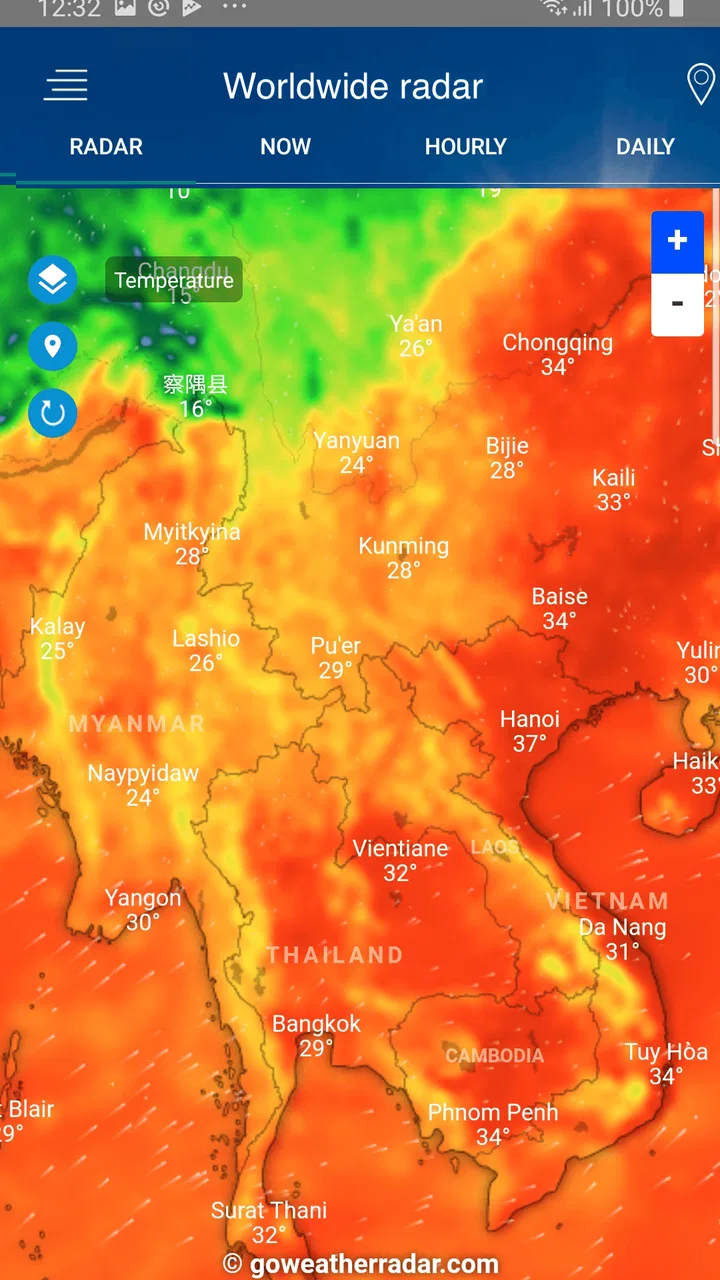
The strongest part of this weather app is the way it turns changing conditions into something I can inspect. A normal forecast may tell me that rain is expected today, but a radar map gives me a better sense of timing and direction. I can look at the colored precipitation areas, compare them with my position, and make a more informed choice about leaving now or waiting. That extra context is especially helpful when the forecast is uncertain or when a short shower matters more than the overall daily outlook.
You May Also Like

 Blood Strike: 2.5 Anniversary
Blood Strike’s Loadouts Turn Every Drop Into a Tactical Gamble
A close look at Blood Strike’s custom loadouts: how fast access to signature weapons reshapes its battle royale rhythm, rewards preparation, and narrows the gap between fights.

 Pandora - Music & Podcasts
Pandora’s Music Is Easy to Start, but Harder to Recover
Pandora’s strength is its low-effort path from a seed to a station. Its weak spot is how much confidence it asks you to place in connection, setup, and quiet recovery.

 8 Ball Pool
 Is Built on Rivalries, Rematches, and Routine
A close look at the rivalries, rematches, shared routines, and unanswered safety questions that turn a quick pool match into a persistent mobile community.

 Samsung Music
’s Quiet Strength Is Playing What You Already Own
Its reach comes less from spectacle than from dependable access to a personal library. That simplicity is both the app’s strongest retention engine and its ceiling.

 AccuWeather: Weather Radar
AccuWeather Review: A Quick, Clear Forecast for Everyday Decisions
For everyday plans, the best forecast is the one you can understand quickly. AccuWeather makes rain timing, radar, and local conditions easy to act on, with a few trade-offs.

 Hill Climb Racing
Why Hill Climb Racing Still Turns Crashes Into One More Run
A tiny car, a bumpy hill and one more upgrade: Hill Climb Racing keeps resurfacing because its simple chaos makes every near-miss feel personal.
More From Our News Desk



For example, imagine I am preparing to walk across town for an appointment. Rather than checking the forecast once in the morning and hoping it remains accurate, I can open the live radar map before leaving. If a rain band is already approaching, I may choose public transport or delay the walk. If the heavier area is moving away, I might leave with a light layer instead of changing my plans completely. The practical strength is not perfect prediction; it is better timing information.
The map format also suits people who think visually. I often understand a moving weather system faster from a broad pattern than from several lines of text. The radar perspective can show whether precipitation is scattered, concentrated, or spread across a wider area. That is more useful than a single weather icon when I need to decide what to do during the next hour.
Another advantage is that the app focuses its identity around radar instead of burying that function inside a crowded collection of unrelated tools. The store summary presents it as a free weather radar app with a live radar weather map, Doppler radar, and radarscope. In practice, that focus gives the app a clear purpose: open it when you want to examine precipitation rather than simply glance at the temperature.
Its popularity suggests that this approach works for many people. The app has a 4.6 average from around 111 thousand ratings, with over 5 million installs and roughly 4.7 thousand written reviews. I do not treat popularity as proof that every forecast will be right, but it does indicate that the radar-centered format has found a substantial audience.
How I use it more effectively than a quick glance
The most useful habit is to check the radar twice when weather affects a plan: once before getting ready and again shortly before leaving. The first check gives me a broad idea of what is developing. The second helps account for movement and changes that may have happened while I was preparing. This two-step routine is more reliable for short outings than relying on a forecast viewed many hours earlier.
I also avoid reading the map as a guarantee. A colored area approaching my location does not automatically mean that every street will receive the same amount of rain. Local terrain, wind, and the limits of radar coverage can all affect what actually happens. I use the display to estimate risk and timing, then leave a little margin when the activity is important.
A less obvious benefit is that the map can help me decide how much preparation is sensible. If precipitation looks isolated, I might carry a compact umbrella rather than cancel an errand. If the pattern appears broad and persistent, I can change the route or postpone the activity. That distinction is more useful than the simple question of whether rain is listed somewhere in the daily forecast.
For cyclists, runners, dog walkers, and parents planning outdoor time, this kind of judgment can be valuable. The app is not only about avoiding rain; it can also show when a short gap may be available. I would still be cautious about using it as the sole basis for safety-critical decisions, but for ordinary scheduling it provides information that many basic weather widgets present too simply.
Where the experience feels less convenient
The same visual focus that makes the app useful can also create friction. A radar map requires interpretation. Someone who wants one immediate answer—“Will it rain at six?”—may find a moving map less direct than a conventional hourly forecast. The app is therefore better suited to users willing to inspect conditions than to people who prefer a single sentence and no further reading.
Maps can also become harder to read on a small phone. Labels, colors, controls, and precipitation layers compete for space, and the broad regional view may need adjustment before the local situation makes sense. I found that zooming and centering are not optional habits; they are part of using the app well. A rushed glance at the wrong map scale can lead to an unnecessarily confident conclusion.
Radar information is inherently more useful for near-term precipitation than for long-range planning. If I am organizing an outdoor event several days away, the radar cannot replace a broader forecast. It shows what is happening or developing around the present moment, while a longer-range service is more appropriate for general planning. This is an important trade-off: the app’s specialty is detail close to now, not a complete answer for every time horizon.
I would also avoid assuming that a radar display removes uncertainty. Weather can change quickly, and light precipitation may be difficult to interpret visually. The app helps me make a better-informed decision, but it does not turn a variable forecast into a certainty. That limitation is not unique to this product, yet it matters because the animated map can feel more precise than the underlying situation really is.
Another point to consider is the Android requirement. Support for Android 5.0 or later is generous, so older compatible phones are not immediately excluded. However, older hardware may make map movement, zooming, or animation feel less smooth than on a recent device. I would not judge the app only on a budget or aging phone without considering that the map itself asks more from the device than a static forecast screen.
Who will get the most from this app
I recommend it most strongly to people whose plans are affected by short-term rain. Commuters who walk between transit stops, delivery workers, outdoor staff, recreational cyclists, and anyone who spends time in parks can use the radar to make small but worthwhile adjustments. It is also a sensible choice for users who dislike checking several weather pages and prefer one focused map for precipitation.
It can be particularly helpful for people who live in places where showers arrive in uneven bursts. A daily forecast may describe the general day correctly while still being too vague for a twenty-minute walk. Watching the radar gives me a better chance of spotting a temporary opening in the weather or preparing for a nearby band that has not reached my area yet.
Families may also find the visual approach convenient. Before taking children outside, I can check whether the next period looks reasonably clear rather than making a decision from the morning forecast alone. The app does not eliminate the need for judgment, but it makes that judgment quicker once I become familiar with the map.
On the other hand, I would point casual users toward a simpler alternative if their only requirement is the current temperature and a basic daily outlook. Someone who wants a compact notification, a minimal home-screen widget, or a long-range planning view may prefer the weather tools already built into a phone or a more traditional forecast app. Installing a radar-focused app makes sense when the map solves a real problem, not merely because more weather information sounds useful.
I would also be cautious about recommending it as the only weather resource for hiking in exposed areas, boating, severe-weather preparation, or other situations where official alerts and specialized forecasts matter. Radar is an excellent part of the picture, but it is not the whole picture. For ordinary errands and outdoor scheduling, that distinction is manageable; for higher-risk activities, it should guide rather than replace more authoritative information.
How it compares with familiar weather alternatives
Compared with a phone’s default weather screen, this app feels more investigative. A built-in forecast is usually faster for checking temperature, broad conditions, and a simple hourly outlook. Weather Radar - Windy, rain ra earns its place when I want to see precipitation as a moving regional pattern. The choice is less about which app is universally better and more about whether I need a quick summary or a closer look at rain.
Compared with a general weather portal, its advantage is concentration. Many larger services combine forecasts, news, alerts, maps, and extra panels. That can be useful, but it may also mean more tapping before reaching the information I actually need. This app’s radar identity makes it a better fit for a user who starts with the question, “Where is the rain, and is it coming here?”
There is a trade-off against specialized meteorological tools as well. A professional or enthusiast-oriented service may offer more layers, model comparisons, or technical controls. Those options can be valuable for users who already understand weather maps, but they can also make a simple decision feel unnecessarily complicated. This app sits closer to practical consumer use: more informative than a basic icon, less demanding than a full forecasting workstation.
My advice is to judge it by the decision you make most often. If your recurring problem is getting caught in a shower during a short trip, the radar view is a meaningful improvement. If your recurring problem is choosing a destination several days ahead, a broader forecast service may serve you better. Keeping both kinds of information available can be sensible, but there is no reason to use a radar map when a simple forecast already answers the question.
Small habits that improve the result
First, I check my exact area rather than relying on the initial regional view. A wide map is useful for understanding the overall movement, but it can hide local gaps or make distant precipitation look more threatening than it is. Zooming in before making a decision is a simple step that prevents many misreadings.
Second, I look for direction and continuity, not just color. A single patch near my location tells me less than a pattern showing whether precipitation is moving toward, across, or away from the area. This is one of the most useful ways to turn the map from a decorative screen into a planning aid.
Third, I leave extra time when the weather matters. If I have an appointment, I do not wait until the last minute simply because the current radar looks clear. I use the app to reduce uncertainty, not to justify an overly tight schedule. That approach has made the tool more helpful and kept me from treating a short-term estimate as a promise.
Finally, I use the app alongside common sense. A dry-looking radar does not mean conditions are comfortable, and a small rain area does not always justify canceling plans. Wind, temperature, visibility, and the nature of the activity still matter. The radar is strongest when it answers one specific question inside a larger decision.
My verdict after using the radar-focused approach
Weather Radar - Windy, rain ra is a worthwhile free weather app for anyone who wants more than a static forecast icon. Its clearest strength is the live radar perspective, which helps me judge the timing and movement of rain in a way that ordinary summaries often cannot. The developer, Accurate Weather Forecast & Weather Radar Map, has built the product around a practical need rather than trying to make every weather function equally prominent.
Its limitations are equally clear. The map takes a little practice, can feel busy on a small screen, and is not the right tool for every forecast horizon or every safety-related decision. Users looking for a minimalist temperature display may find it more involved than necessary, while serious weather enthusiasts may eventually want deeper analysis than a consumer radar app provides.
Still, I think the balance is good for everyday planning. The free price removes the main barrier to trying it, the Everyone age rating makes it broadly approachable, and support for Android 5.0 or later gives it a wide device range. I would choose it when rain timing matters, not simply because I want another general forecast. For a walk, commute, bike ride, or outdoor errand, that distinction makes the app genuinely useful.
My final recommendation is straightforward: install it if you regularly ask whether a shower is approaching and how long you can safely stay outside. Learn to zoom into your location, watch the direction of the precipitation, and check again before leaving. If you only need a quick temperature reading, keep using a simpler alternative. For everyone in between, this radar-centered app offers a practical middle ground and earns its place as a focused weather companion.
FAQs for Weather Radar - Windy, rain
01What features does Weather Radar - Windy, rain ra offer?
Weather Radar - Windy, rain ra provides users with real-time weather updates, detailed radar maps, and forecasts for wind, rain, and storms. The app includes customizable alerts, satellite imagery, and widgets for quick access. It also offers detailed weather information for specific locations and interactive maps to visualize weather patterns.
02Is Weather Radar - Windy, rain ra free to use, or does it require a subscription?
Weather Radar - Windy, rain ra offers a free version with basic features, but to access advanced options like ad-free browsing, extended forecasts, and premium radar features, a subscription is required. The subscription model is typically based on either monthly or annual payments, providing enhanced functionality for serious weather enthusiasts.
03How accurate is the weather data provided by Weather Radar - Windy, rain ra?
The app utilizes a combination of data from trusted meteorological sources and satellite imagery to provide accurate and up-to-date weather information. While no weather app can guarantee 100% accuracy due to the unpredictable nature of weather, Weather Radar - Windy, rain ra is known for its reliability and precision in weather forecasting.
04Can I customize alerts and notifications in Weather Radar - Windy, rain ra?
Yes, Weather Radar - Windy, rain ra allows users to customize alerts and notifications based on their preferences. You can set alerts for specific weather conditions such as rain, wind, storms, or temperature changes. This feature ensures you are informed about important weather changes that may impact your plans.
05Is Weather Radar - Windy, rain ra available for both Android and iOS devices?
Yes, Weather Radar - Windy, rain ra is available for download on both Android and iOS platforms. Users can easily find the app on the Google Play Store and the Apple App Store, ensuring compatibility with a wide range of smartphones and tablets for convenient access to weather updates.
Pros
- Accurate real-time weather updates.
- User-friendly interface with easy navigation.
- Customizable alerts for severe weather.
- Detailed radar maps with high resolution.
- Supports multiple languages for accessibility.
Cons
- Frequent ads can interrupt user experience.
- Requires a strong internet connection.
- Some features locked behind a paywall.
- Occasional lag on older devices.
- Battery consumption can be high.

Weather Radar - Windy, rain
Gallery